Overview
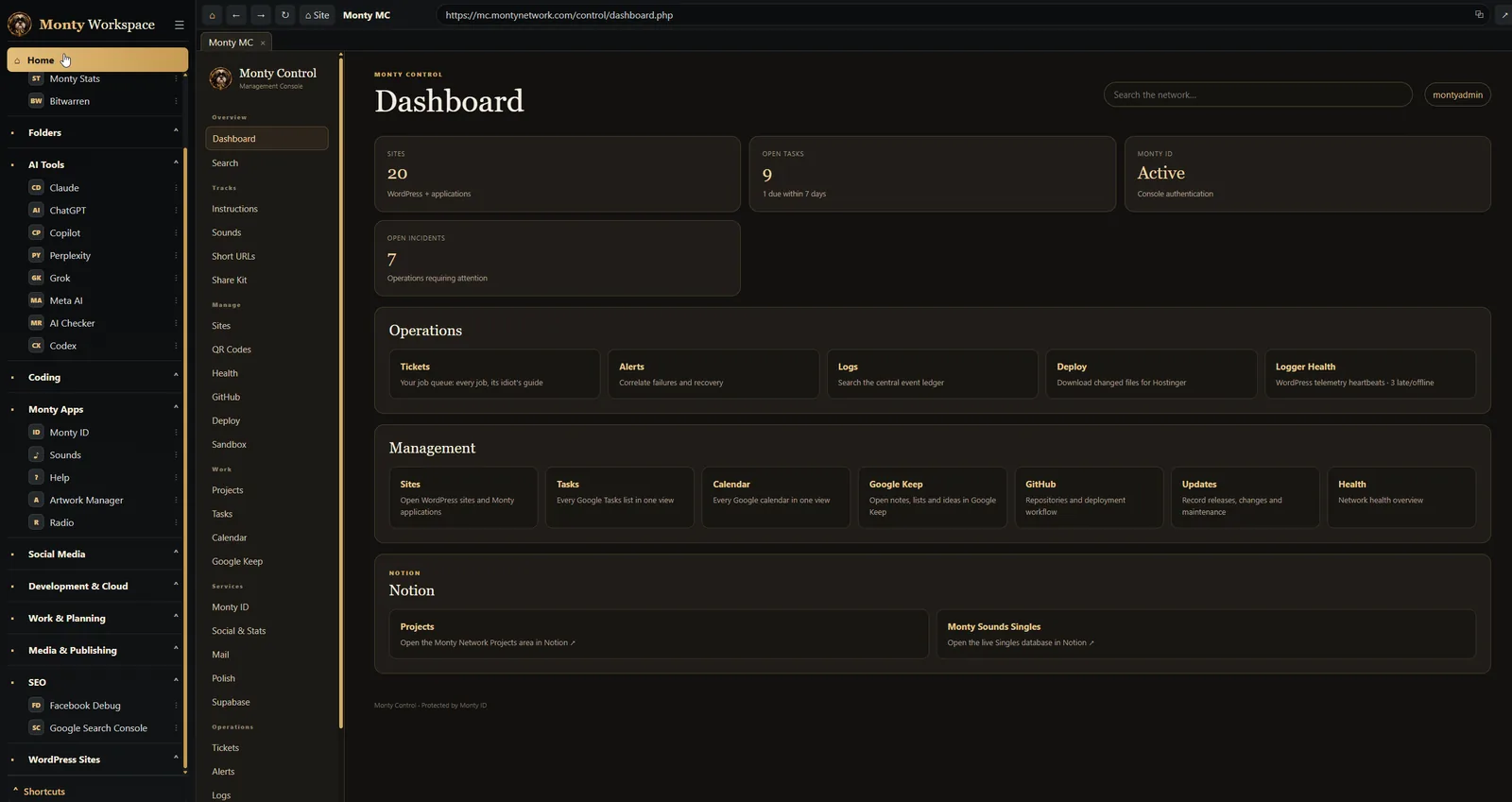
Monty Workspace is a Windows app that gathers the websites, tools and folders I use every day into a single window. It's where I run Monty Network from: Monty Control, social media, the AI tools, GitHub, Cloudflare and Hostinger, my folders on the laptop, and the Windows programs I reach for most.
It isn't for sale and it isn't for anyone else. It was designed, built and is used by one person: me. That's what makes it worth a case study. Every feature exists because I needed it on a real working day.
This case study covers why it exists, what it does, how it keeps itself up to date, and how, thirty days after the first line was written, it learnt to speak Polish.
Monty Workspace at a Glance
One window. Every sign-in kept. Nothing to hunt for.
Why I Built It
Running a network on your own means living in a browser. Monty Control in one tab, Hostinger in another, Cloudflare, Supabase, GitHub, Notion, the social networks, a handful of AI tools, and the sites themselves. Spread across several windows and several screens, it became a daily game of hide and seek.
Ordinary browsers are built for wandering. I needed something built for working: the same places, every day, exactly where I left them, already signed in.
So I built a home for them. Not another browser, but a workspace with the network's colours, the network's sections and the network's dog on the front.
One rule for the workspace.
Nothing I use every day should be more than one click away, and nothing should ever ask me to sign in twice.
The Challenge
A workspace for one person sounds simple. Behind it sat a set of awkward demands:
- every site keeps its own sign-in, and they all survive closing the app, restarting the laptop and updating the app itself
- websites, Windows programs and folders on the laptop all have to live in the same sidebar
- the organisation is mine to change, not fixed in code: rename, move, sort or remove anything
- it must never get in the way of a website it's showing, its keys, its menus or its downloads
- it has to stay current without me building and installing it by hand
The last one turned out to matter most. An app you build for yourself is easy to neglect, because nobody else will ever complain. It needed to look after itself.
The Sidebar
Everything starts in the sidebar. Today mine holds eleven sections: Favourites, Folders, AI Tools, Coding, Monty Apps, Social Media, Development & Cloud, Work & Planning, Media & Publishing, SEO and WordPress Sites.
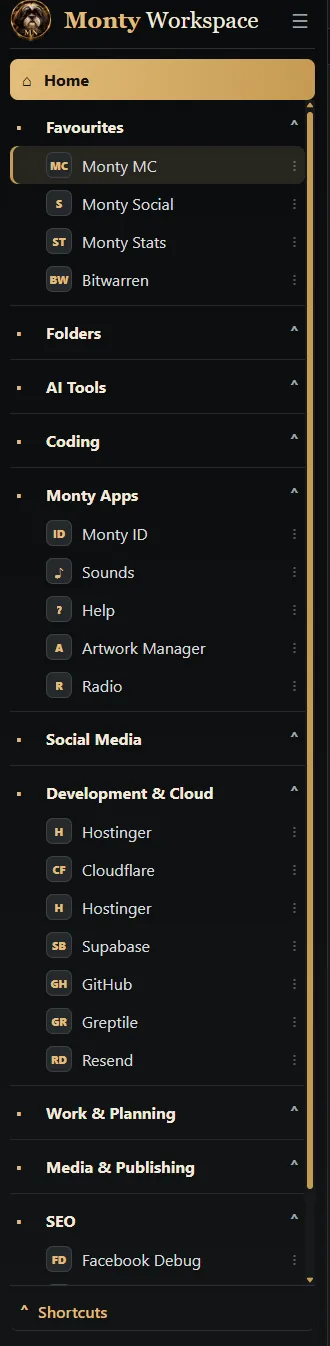
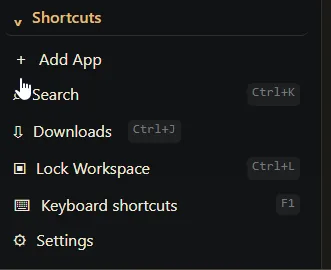
- Three kinds of app. A website, a Windows program, or a folder on the laptop. Add App asks which, and the sidebar treats them all the same way.
- Mine to arrange. Drag an app up, down or into another section. Right-click a section to sort it A–Z, Z–A or by hand, and each section remembers its own choice.
- Nothing is permanent. Every app can be renamed, edited or removed with the ⋮ beside it. Removing a Windows program only removes its shortcut; it never uninstalls anything.
- No profiles, on purpose. There's one workspace, mine, so there's nothing to switch between.
Tabs That Remember
Each website opens in its own tab, and each one keeps its own sign-in, stored on the laptop and kept through restarts and updates. Sign in to the Monty sites once with Monty ID and the others recognise you too.
- Names that stay put. Right-click a tab to rename it. The name stays whatever the website does to its own title, and it's remembered next time.
- A real address bar. Type an address, a search or even a folder path on the laptop, and press Enter.
- Proper right-click menus. Copy a link, an image or the page address, save as, open in a new tab, or search Google for the words you've selected.
- Zoom per site. Each website remembers its own zoom, so a busy dashboard can sit smaller than a page I read.
- Back where I left off. If I choose, every open tab returns when Workspace starts again.
Downloads get the same care: a progress pill in the toolbar, a Windows notification when they finish, and a Downloads panel where nothing is ever overwritten.
Monty Control Inside
Most of my day is spent in Monty Control, the network's control centre, and Workspace is where it lives on the laptop. Health, tickets, logs, deploys, the music tools: all of it in one tab, with the rest of the network one click away in the sidebar.
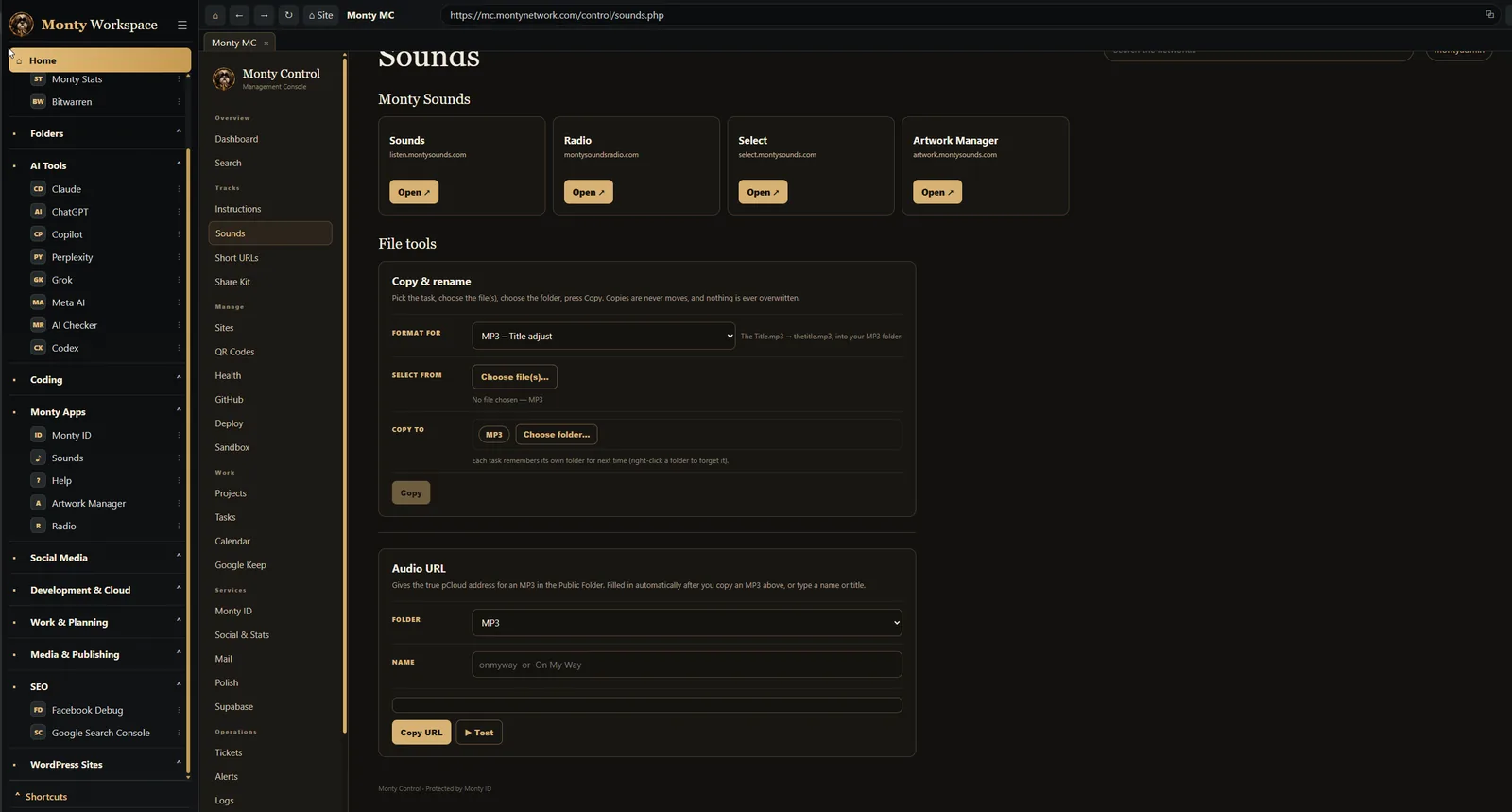
The pairing works because Workspace never gets in its way. Monty Control's own menus, keys and file tools behave exactly as they would in a browser, and when a job needs files from the laptop, the folder is already in the sidebar.
Folders on the Desk
A lot of my work ends with files: a page to upload to Hostinger, an MP3 for the radio, a copy of a repository synced from GitHub. So in October 2026 folders joined the sidebar. Click one and a file browser opens inside Workspace, in its own tab beside the websites.
- Everything Explorer does, where I already am. Open, rename, copy, cut and paste, duplicate, compress to ZIP, open in VS Code or a terminal, and the full Windows menu when I need it.
- Search that goes deep. Search the folder as you type, or tick Include subfolders to search everything beneath it.
- Drag straight to the web. Drag a file out of Workspace into Hostinger's file manager in the next tab.
- Safe by design. Deleting always goes to the Recycle Bin, changes stay inside my folder shortcuts, and a shortcut's own top folder can't be renamed or deleted from here.
Keys and Locks
When you use something all day, the mouse becomes the slow way round. Workspace has 38 keyboard shortcuts, and F1 shows them all on one sheet I can search.
- Ctrl + K finds any app or site by name or section.
- Ctrl + J opens Downloads.
- Alt + D jumps to the address bar.
- Ctrl + L locks Workspace.
Locking hides every tab behind a lock screen while the websites stay signed in underneath. It can also happen on its own after five, ten, fifteen or thirty minutes away.
The Home screen does the rest. It gathers every Google Calendar and every Google Tasks list into two panels, so the day ahead is the first thing I see.
It Updates Itself
In the middle of October I learnt a lesson the hard way. The newest version of Workspace existed only as the app installed on my laptop, and its code had to be recovered from the installed app itself. Since then, GitHub has been the one true copy.
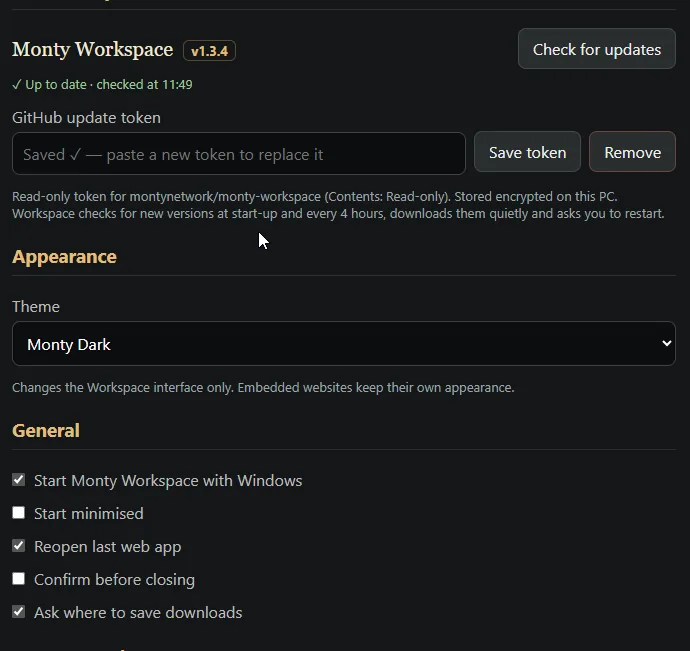
From version 1.3.0, that copy also builds itself. When I change the version number, GitHub builds the Windows installer and publishes it as a private release. Workspace checks at start-up and every four hours, downloads the new version quietly, then shows Update ready · Restart in the toolbar. If I ignore it, it installs the next time I close the app.
It sounds like a small thing. It means no version is ever stranded on one laptop again.
Two Languages
I live in Poland, and Polish is hard for me, so I surround myself with it wherever I can. On 3 November 2026, version 1.3.5 taught Workspace Polish.
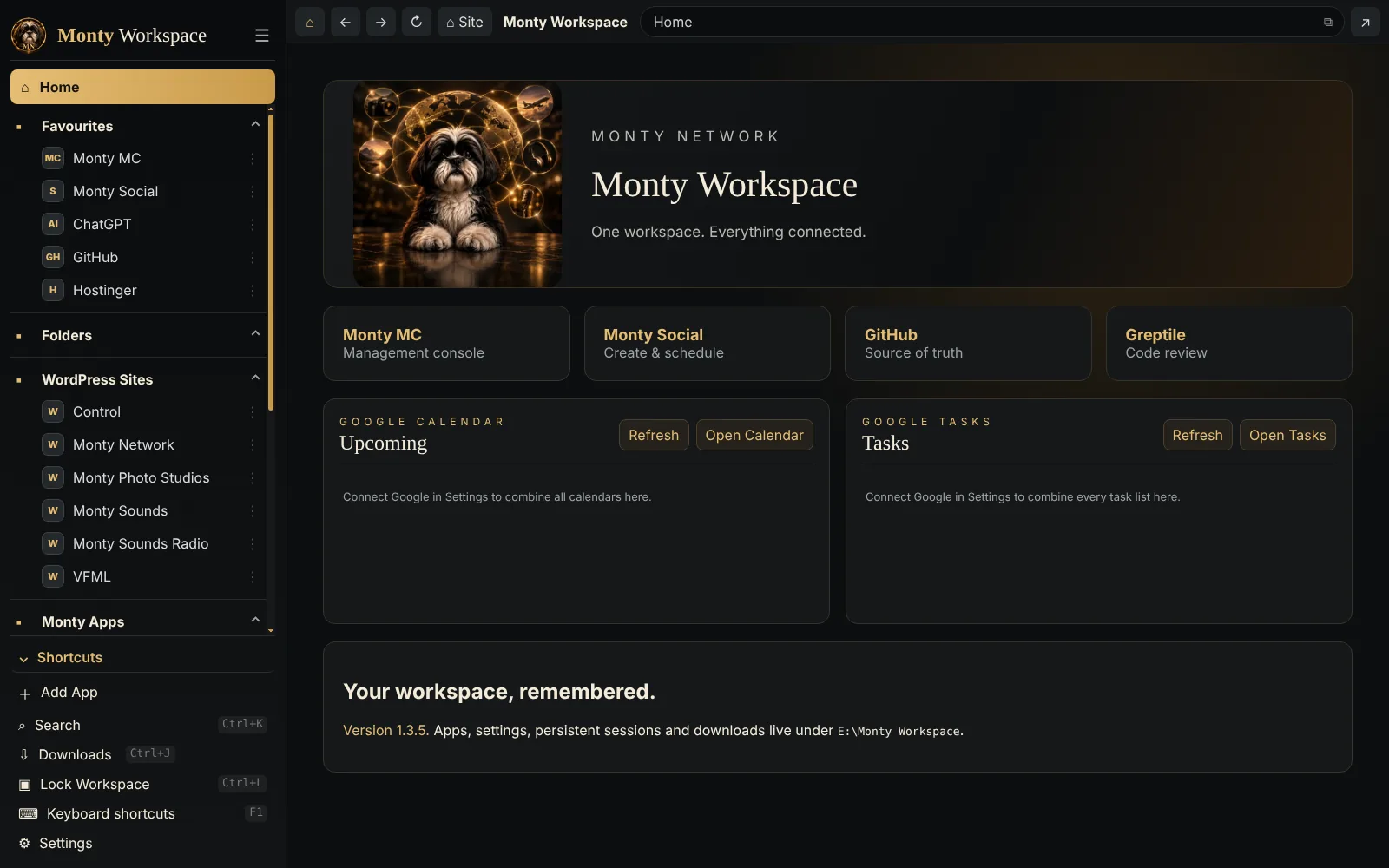
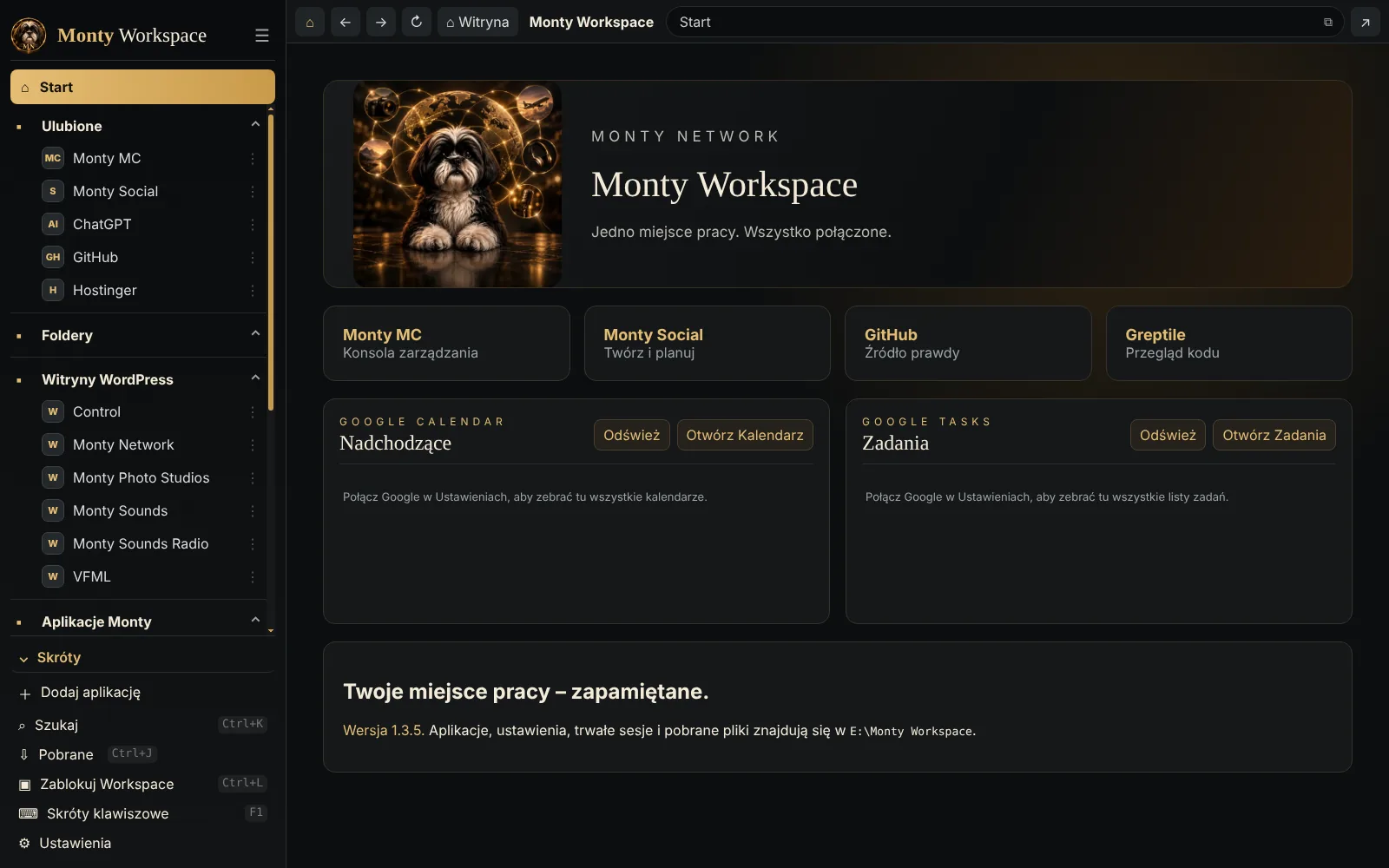
One setting changes everything Workspace says, at once and without a restart: menus, buttons, messages, the shortcuts sheet, Windows notifications and every right-click menu. Home becomes Start, and Move to the Recycle Bin becomes Przenieś do Kosza.
- Polish counts properly. One element, three elementy, five elementów: the app knows Polish has three ways to count.
- Nothing gets renamed. The built-in sections are shown in Polish but stored in English, so switching back and forth never changes my set-up. My own names, and the websites inside, stay as they are.
Results
Workspace grew quickly because it was used every day from the first week, and every rough edge was felt the same day.
The bigger result is quieter. I no longer go looking for things. Every site, folder and tool I work with is where I left it, already signed in, in one window.
Figures as of 3 November 2026, from GitHub and Monty Workspace itself.
What's Next
Workspace is never finished, because the network it holds keeps growing.
- Whatever the day asks for. New features arrive when real work shows a need, the same way the folder browser and the shortcuts sheet did.
- Still just for me. One person, one workspace, no profiles. That rule isn't up for review.
What I've learnt
Build for the day you actually have. Every useful part of Workspace started as a small annoyance on an ordinary afternoon, and the most important feature of all, updating itself, came from nearly losing it.
One window. Everything open.