Overview
Every job in the Monty Network, from uploading one file to moving a whole photo gallery, lives as a ticket in Monty Control. The ticket is the one place I work from. It says why the job exists, how to do it step by step, how to prove it worked, how to undo it, and when it's finished.
Most ticket systems are built for teams who share the memory of a project between them. I'm one person, and my memory of a job fades the moment I close the laptop. So every ticket is written for a reader who has forgotten everything: me, a week or six months from now.
This case study takes one real ticket, MC-2026-0143, and walks through it section by section: what each part is for, and the rules that grew up around it.
The Ticket Method at a Glance
One ticket. One source of truth. Nothing left to memory.
Why I Built It
Running fourteen websites and a handful of apps on my own means a lot of small jobs that can't be finished in one sitting. Something gets planned on the phone in the afternoon, and the work happens at the laptop late in the evening.
For a while those jobs lived in chats, notes and a log that grew faster than I could read it. New jobs were hard to find. Steps I'd been told to do were scattered across conversations. More than once I sat down at the laptop and couldn't remember which file went where.
So I made one rule: the ticket is the source of truth. Everything a job needs goes inside it, written so plainly that it can't be misread. Everything else only points back to it.
One rule for every ticket.
A tired me, at 11 at night, months from now, should be able to finish the job from the ticket alone, without remembering anything.
The Ticket Family
A ticket never stands entirely alone. Big pieces of work get one main ticket, and each part of that work becomes a sub-ticket under it, with a short code saying which part of the network it belongs to.
- Codes that say where. GALLERY is the photo gallery, VFML the journal, MSOUNDS the music, MSOCIAL social media, MSTATS the statistics. A sub-ticket's number carries its parent's: MC-2026-0063-VFML-001.
- New problems join their family. A fresh issue on a project already underway becomes another sub-ticket, not another main ticket.
- Signposts, not copies. The Google Task and the Logs thread never hold the instructions. They only point to the ticket, so there's only ever one version to trust.
Anatomy of a Ticket
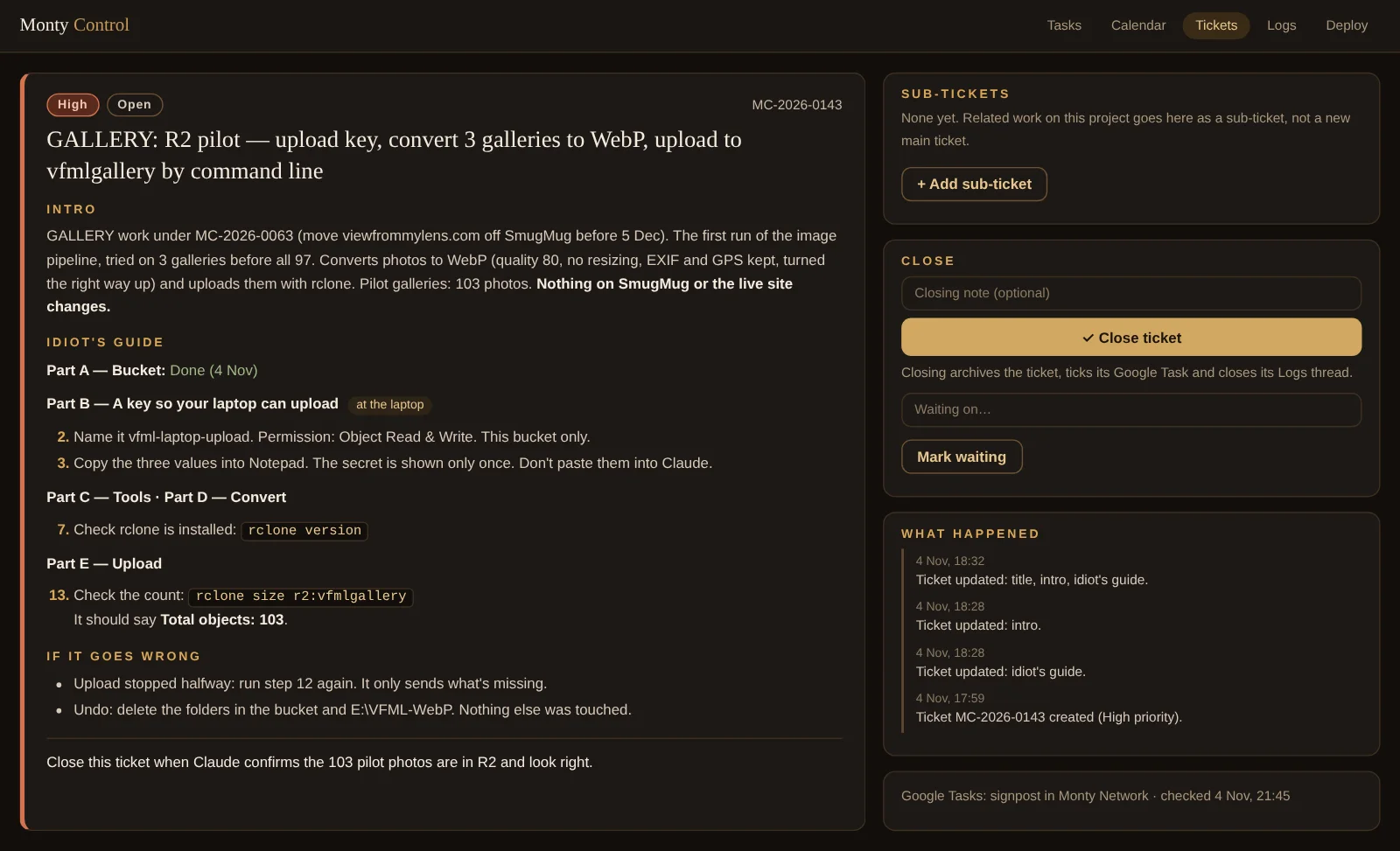
Here is MC-2026-0143, the first test run of moving my photo galleries off SmugMug, as it looks on a laptop screen. Each numbered part has one job.
1GALLERY: R2 pilot — upload key, convert 3 galleries to WebP, upload to vfmlgallery by command line
2Intro
GALLERY work under MC-2026-0063 (move viewfrommylens.com off SmugMug before 5 Dec). The first run of the image pipeline, tried on 3 galleries before all 97. Converts photos to WebP (quality 80, no resizing, EXIF and GPS kept, turned the right way up) and uploads them with rclone. Pilot galleries: 103 photos. Nothing on SmugMug or the live site changes.
3Idiot's guide
Part A — Bucket: Done (4 Nov)
Part B — A key so your laptop can upload at the laptop
- Name it vfml-laptop-upload. Permission: Object Read & Write. This bucket only.
- Copy the three values into Notepad. The secret is shown only once. Don't paste them into Claude.
Part C — Tools · Part D — Convert
- Check rclone is installed:
rclone version
Part E — Upload
- 4Check the count:
rclone size r2:vfmlgallery
It should say Total objects: 103.
5If it goes wrong
- Upload stopped halfway: run step 12 again. It only sends what's missing.
- Undo: delete the folders in the bucket and E:\VFML-WebP. Nothing else was touched.
6Close this ticket when Claude confirms the 103 pilot photos are in R2 and look right.
Sub-tickets
None yet. Related work on this project goes here as a sub-ticket, not a new main ticket.
+ Add sub-ticket7Close
Closing note (optional)✓ Close ticketClosing archives the ticket, ticks its Google Task and closes its Logs thread.
Waiting on…Mark waiting8What happened
- 4 Nov, 18:32Ticket updated: title, intro, idiot's guide.
- 4 Nov, 18:28Ticket updated: intro.
- 4 Nov, 18:28Ticket updated: idiot's guide.
- 4 Nov, 17:59Ticket MC-2026-0143 created (High priority).
Google Tasks: signpost in Monty Network · checked 4 Nov, 21:45
- Title. Starts with the sub-code, then says exactly what gets done. Scannable in a long list.
- Intro. Why the job exists, which project it belongs to, what it will change and what it must not.
- Idiot's guide. Every step, in order, in parts, with the exact words to type.
- Proof. The command to run and the answer to expect.
- If it goes wrong. The likely failures, their fixes, and how to undo the lot.
- Close when. One sentence that decides when the job is finished.
- Close and wait. Closing ticks the Task and the Logs at once; waiting parks a job without losing it.
- What happened. Every change to the ticket, kept as its history.
The Intro
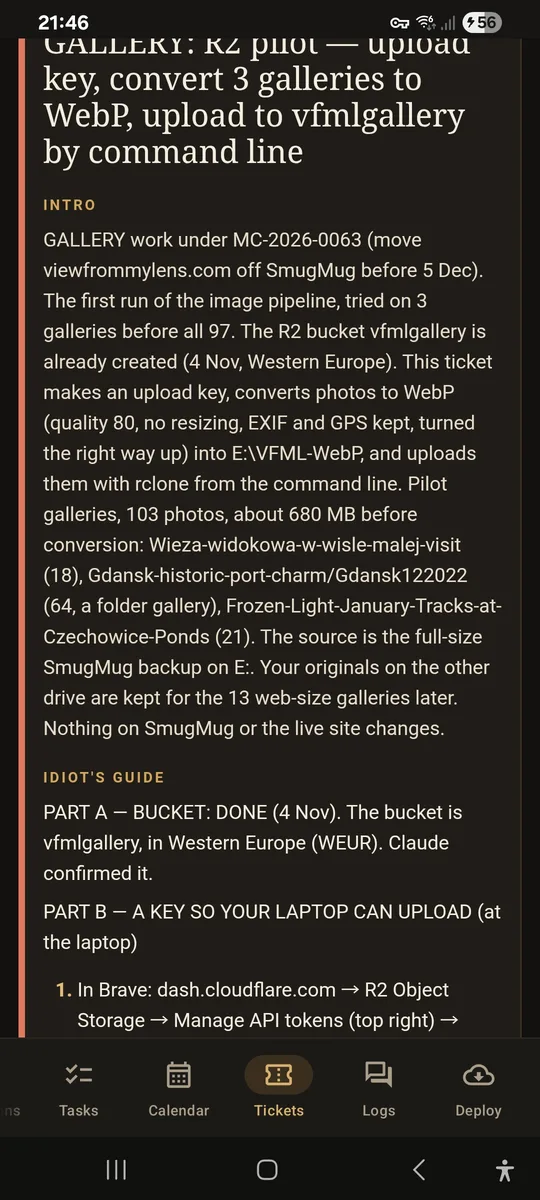
The intro is written for someone arriving cold. In a few sentences it answers five questions:
- What is this? A test run of the photo pipeline on three galleries.
- Why does it exist? SmugMug ends on 5 December, and 97 galleries need a new home.
- Where does it belong? Under MC-2026-0063, the main gallery ticket.
- What will happen? 103 photos converted to WebP and uploaded to the new bucket.
- What must not change? Nothing on SmugMug or the live site.
That last line matters more than it looks. Saying what a job must not touch draws a safety line around it, and it's the line most often forgotten.
The Idiot's Guide
The name is deliberate. It forces every step to be written for someone who is tired, distracted and in a hurry, because that's who will follow it.
- Parts, not a wall. Part A to Part E, each with a plain name. A part that's already finished says so, with its date.
- Where it happens. Steps that need the laptop say at the laptop, so a ticket read on the phone doesn't pretend it can be done there.
- The exact words. Not configure rclone but the one line to type, with the parts to replace in capitals.
- The reason behind the step. A key so your laptop can upload says what the key is for, not just how to make it.
- Safety in the step itself. The secret is shown only once. Don't paste it into a chat. Delete the note afterwards.
Most guides are drafted with Claude, from the conversation where the job was worked out. I then follow them for real, and anything that didn't match the screen in front of me goes back into the ticket.
Proving It Worked
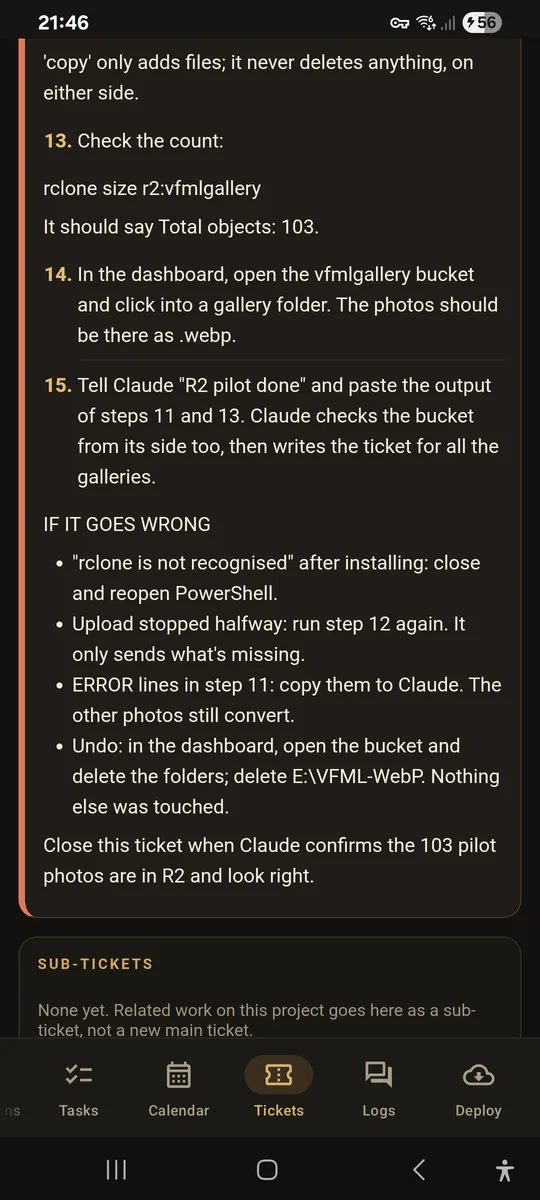
A step isn't done because it felt done. Every important stage carries a check: the thing to run, and what a good answer looks like.
rclone ls r2:vfmlgalleryExpectNothing printed, and no error. The bucket is empty and the key works.
rclone size r2:vfmlgalleryExpectTotal objects: 103. Every pilot photo arrived.
Open one .webpExpectIt looks right and isn't sideways.
Numbers are the best proof, because they can't be misread. A count that should be 103 either is or it isn't.
If It Goes Wrong
Every ticket expects something to fail, and says what to do before it happens. The fixes are written while the job is fresh in mind, not discovered at midnight.
- A tool isn't recognised after installing. Close the window and open a new one.
- The upload stops halfway. Run the same step again. It only sends what's missing.
- Error lines appear. Copy them into the chat. The other photos still convert.
The last line is always the way back. Undo: delete the folders in the bucket and the converted folder. Nothing else was touched. Knowing the way out makes it far easier to start.
Close When
Every ticket ends with one sentence deciding when it's finished. For the pilot: close this ticket when the 103 pilot photos are confirmed in R2 and look right. Not when the upload ran. When the result was checked.
Closing then does three things at once: the ticket goes to the archive, its Google Task is ticked and its Logs thread closes. Nothing is left half-open in another place.
- Waiting is not closing. A job stuck on something outside my hands is marked waiting, with what it's waiting on, and stays in the queue.
- "Up to date" is not done. Having the latest code on the laptop isn't the same as the job being finished, so it never closes a ticket on its own.
- Families close from the bottom. A main ticket can't be closed while any sub-ticket under it is still open.
House Rules
Over time some lessons became rules that every ticket respects. Each one came from a real mistake, or a near miss.
- One repository, one live folder. Every GitHub repository matches exactly one folder on the server, with the same name, so I always know where to look.
- Rename before you replace. Before uploading a new version of a file, the old one is renamed, not overwritten, so going back takes seconds.
- Apps state their version. Any change to an Android app bumps its version, and the ticket names the new number, so I know the right build is the one installed.
- Key files are edited, never swapped. A file that holds the network's keys is only ever changed in place.
- Secrets stay out of chats. Keys and passwords go straight where they're needed, never into a conversation.
- Every change leaves a record. Changes to Monty Control always write to its Logs.
Results
The method earns its keep in volume. In nine days at the end of October, Monty Control held more tickets than I'd once have tracked in a month.
The bigger result is quieter. I no longer sit down at the laptop wondering what I was meant to do. I open the ticket, and it tells me.
Figures as of 4 November 2026, from Monty Control.
What's Next
The method will keep changing, because every ticket that's hard to follow teaches it something.
- Each ticket stays its own story. Jobs in the network are rarely alike, so the guide lives inside the ticket rather than in a separate library of procedures.
- The archive is the memory. Closed tickets keep their guides and their history, so a job done once can be found again by searching for it.
What I've learnt
Write for the person who will actually read it. Not the one who knows the project inside out, but the one who has forgotten it entirely. In my case, they're the same person, a few weeks apart.
Written for future me.
Built for my own network — this isn’t a public product. Want something like it for yours? I build bespoke.
Contact us ↗